
Business Details
16 Years
experience
Your Design Toolkit for Seamless Collaboration
At Sketchpad, we are dedicated to empowering designers with a toolkit that prioritizes creativity and efficiency. Founded in 2010, our platform has evolved to become a cornerstone for UI and UX professionals worldwide. As an independent company, we maintain full control over our roadmap, ensuring our product aligns with the needs of designers rather than external investors. Our commitment to privacy is unwaveringwe collect minimal analytics, avoid intrusive tracking, and guarantee that your data remains yours. We champion an open file format, allowing seamless transitions to other tools if needed.Our focus on macOS ensures a native, intuitive experience, while features like real-time collaboration, advanced prototyping, and developer handoff tools streamline workflows. We reject AI-driven design replacements, advocating for technology that enhances human creativity. With transparent pricing and a community spanning freelancers to Fortune 500 companies, we remain steadfast in our mission to create software that puts designers first.


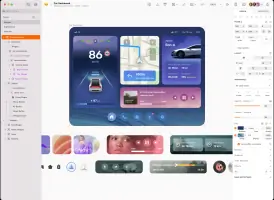
Services
Product Design
Collaboration
Prototyping
Developer Handoff
Free Handoff Tools
Details
- Year established: 2010
Highlights and features
- We offer a native macOS app optimized for design efficiency.
- Our platform supports offline work with local file storage.
- Real-time collaboration and shared component libraries enhance teamwork.
- We prioritize privacy with minimal data collection and no tracking.
- Open file format ensures flexibility for future transitions.
What people say
Easy and wonderful
Indispensable
Design with little limitation
Love the simplicity
Constantly improving
Services
Product Design
Our platform provides focused tools for UI and UX design, including vector editing, stack layouts, and infinite canvas. Designers benefit from an intuitive interface that minimizes distractions. With hundreds of free templates and component libraries, workflows are accelerated without compromising flexibility.
Collaboration
Real-time co-editing and shared workspaces enable seamless teamwork. Clients can view designs in browsers, while comment threads and version control streamline feedback. Guest editors collaborate without additional costs, and component libraries ensure consistency across projects.
Prototyping
Create realistic prototypes in under 10 clicks with modals, overlays, and Smart Animate features. Test interactions like hover, press, and swipe across devices. Horizontal, vertical, or multi-directional scroll areas enhance user experience simulations.
Developer Handoff
Free handoff tools allow developers to inspect designs, download assets, and export tokens. Seamless integration bridges design and development phases, reducing errors. Native macOS support ensures compatibility with developer workflows.
Free Handoff Tools
Developers can access design files for inspection and asset extraction at no cost. This feature simplifies the transition from design to code, ensuring precision and reducing back-and-forth communication. Export tokens and assets directly from the platform.
Questions
What operating systems does Sketchpad support?
Sketchpad is optimized for macOS Sonoma (14.0.0) or newer as a native app.
Can I use Sketchpad offline?
Yes, Sketchpad allows offline design with local file storage, requiring no internet connection.
How does Sketchpad handle user privacy?
We collect minimal analytics, avoid tracking, and ensure files remain private unless shared explicitly.
What collaboration features are available?
Real-time co-editing, shared workspaces, comment threads, and component libraries support team workflows.
Is there a free plan for Sketchpad?
Sketchpad offers a perpetual license or subscription with cloud storage; no free plan is available.